Book freight in two requests.
POST the freight and its stops to get rates. POST the rate you pick to book it. Every status change after that posts to your server.
Request body
{"freight": [{ "quantity": 2, "type": "Pallet", }],"pickup": { "name": "Griffith Observatory", },"delivery": { "name": "LACMA", },"pickupReadyDate": { "date": "2024-10-15", "time": "1000" }}201 Created
{"data": {"id": "-LawNN52lCcvj6T5qiEp","expiresAt": "2019-03-26T23:51:40.485Z","rates": [{ "id": "VDWLA0", "price": 79, },{ "id": "G6EMET", "price": 108, }],"freight": [ ],"pickup": { "name": "Griffith Observatory", },"delivery": { "name": "LACMA", },"metadata": { "purchasable": true, }}}Book it with the quote's id and the id of the rate you want.Create a quote
Get started
Create a token in the dashboard. Requires an approved Mothership account.
 Get API keys
Quote, book and track LTL, truckload and same-day local freight. JSON over HTTPS, one Bearer token, and a webhook for every status change.
Live rates from
Powered by
Book and track
From booking to invoice with one ID.
Book with the quote's ID and the rate you pick. The booking returns a shipment ID, MS5016101 here, and it's the only ID you need to track the shipment, download its documents and fetch its invoices.
POST/shipmentsGET/trackingGET/documentsGET/invoices






Request body
{ "quoteId": "-LawNN52lCcvj6T5qiEp", "rateId": "G6EMET" }201 Created
{"data": {"id": "MS5016101","trackingUrl": "https://dashboard.mothership.com/track/MS5016101","status": "Unallocated",}}Both ids come from the quote. That is the whole request.Create a shipment
200 OK
{"data": {"results": [{ "status": "Unallocated", },{ "status": "DriverAllocated", },{"timestamp": "2019-03-19T19:31:11.124Z","status": "EnrouteToPickup","description": "Carrier is en route to the pickup location","city": "Los Angeles",}]}}MS5016101 is the id the booking returned.Track a shipment
200 OK
{"data": [{"type": "billOfLading","url": "https://s3-us-west-1.amazonaws.com/mothership-shipments-bill-of-lading/MS5016101.pdf","expiresAt": "2026-03-19T17:00:00.000Z"}]}Each document URL expires, so ask again for a fresh one.List shipment documents
200 OK
{"data": {"invoices": [{ "id": "3f1c2a9e-5b7d-4e8a-9c61-2d4f8b0e7a15", }],"total": 1,}}Fetch each one by its id for the line items.List a shipment's invoices
These are the reference's own examples. Run them in the quickstart →
Webhooks
Stop polling. We'll POST to you.
Subscribe a URL once. Every status change, booking and document arrives as a signed JSON POST, and we send it again until your server answers.
Shipment has been purchased, but has not been assigned to a partner carrier. All shipments begin in this status.
Content-Type: application/json
X-Mothership-Signature: HMAC-SHA256 of the raw body, keyed with your secret
{"eventType": "shipment.status.updated","data": {"newShipmentStatus": "Unallocated","shipmentId": "MS123456"},"sentAt": "2026-10-08T15:04:05.000Z","deliveryAttempt": 1,"pendingRetries": 16}Your server answers 200 OK, or any 2xx, and the delivery is done.
23 events
Shipments
- shipment.purchased
- shipment.status.updated
Documents
- billOfLading.created
- billOfLading.updated
- proofOfDelivery.created
- proofOfDelivery.updated
- deliveryReceipt.created
- deliveryReceipt.updated
- certificateOfInsurance.created
Rebills
- shipment.rebill.created
- shipment.rebill.status.updated
- shipment.rebill.accepted
- shipment.rebill.finalized
- shipment.rebill.waived
- shipment.rebill.voided
- shipment.rebill.dispute.created
- shipment.rebill.dispute.status.updated
- shipment.rebill.dispute.resolved
- shipment.rebill.dispute.deleted
Invoices
- invoice.created
- invoice.updated
- invoice.status.updated
- invoice.paid
Signed
Each delivery carries X-Mothership-Signature, an HMAC-SHA256 of the raw body keyed with your webhook's secretKey.
Retried
If your server doesn't answer 2xx, we try again, up to 17 attempts over a few days. Each one counts itself in deliveryAttempt.
Errors
Errors tell you what to change.
Every error is the same flat JSON: a code, a type, a message, and metadata when there is more to say. This cancellation caps its fee below what cancelling costs, so the 402 names the fee and the request that would work.
Request body
{"reason": "ShipmentNotNeeded","acceptFees": true,"limitAmountCents": 5000}402 Payment Required
{"code": 402,"type": "PAYMENT_REQUIRED","message": "Cancelling this shipment currently incurs a fee of $75.00. Retry with \"acceptFees\": true or set \"limitAmountCents\" to at least 7500.","metadata": {"feeCents": 7500,"availableCancellationOptions": [{ "type": "PrePickup", "feeCents": 7500 }]}}The message says what to send instead, and metadata has the numbers.Cancel a shipment
12 error types
- 400, 409
INVALID_REQUEST - 400
CARGO_TOO_LARGE - 400
NO_RATES_FOUND - 400
QUOTE_NOT_PURCHASABLE - 401
UNAUTHENTICATED - 402
PAYMENT_FAILED - 402
PAYMENT_REQUIRED - 403
MISSING_PERMISSION - 404
NOT_FOUND - 429
RATE_LIMIT_EXCEEDED - 500
SERVER_ERROR - 500
UNKNOWN
Retries
Every response has X-RateLimit-Remaining, so you can slow down before a 429. A 429 says how long to wait in Retry-After.
Fix a 4xx before you send it again. Retry a 5xx with backoff.
Rate limits →Request IDs
Every response has an mshp-request-id header. Send it with your question and we can find the request in our logs.
Developer portal
See what the API saw.
The Developers page in the dashboard keeps 15 days of your API requests and webhook deliveries. Open any one to see what was sent, what came back and how long it took.
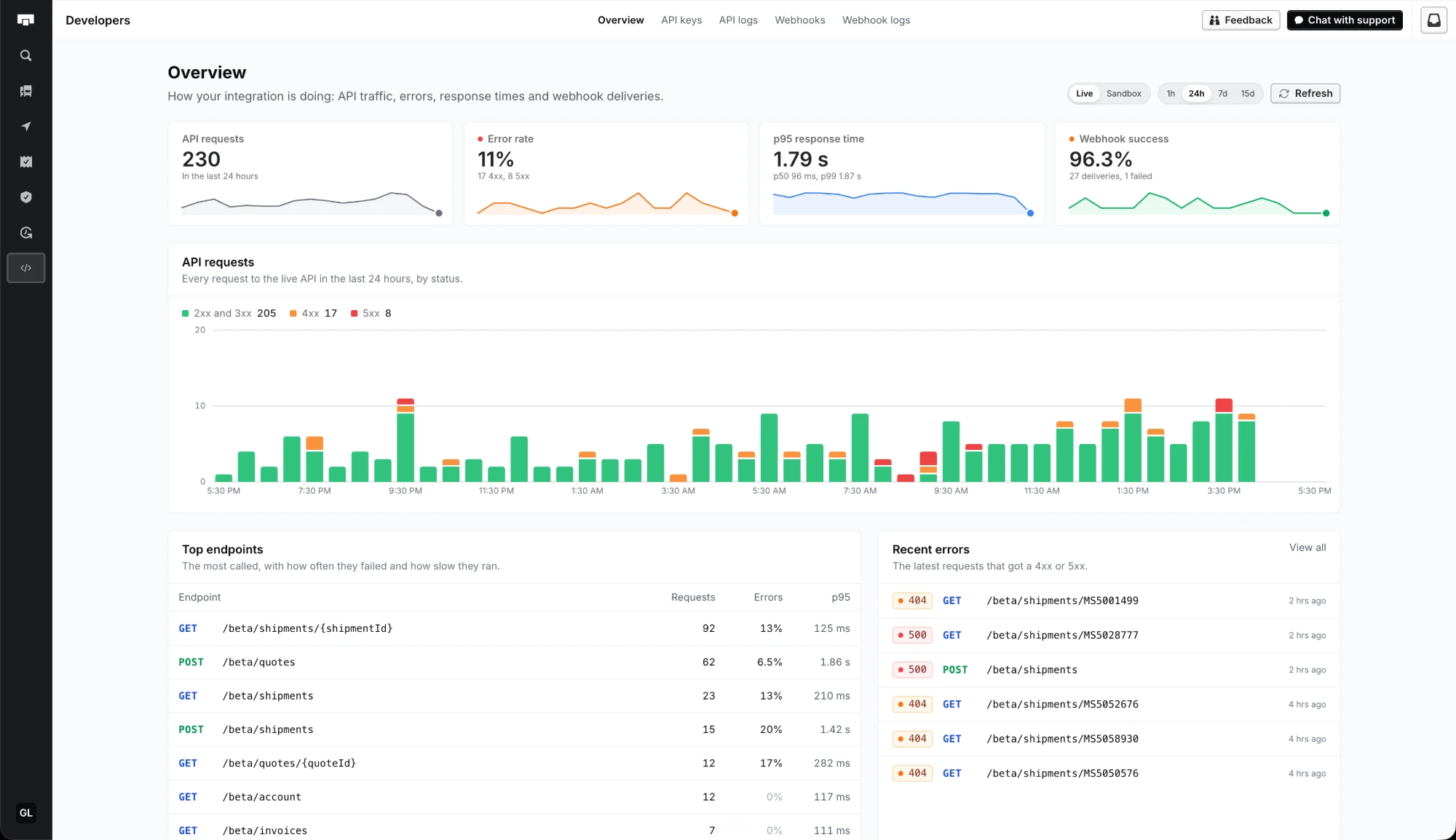
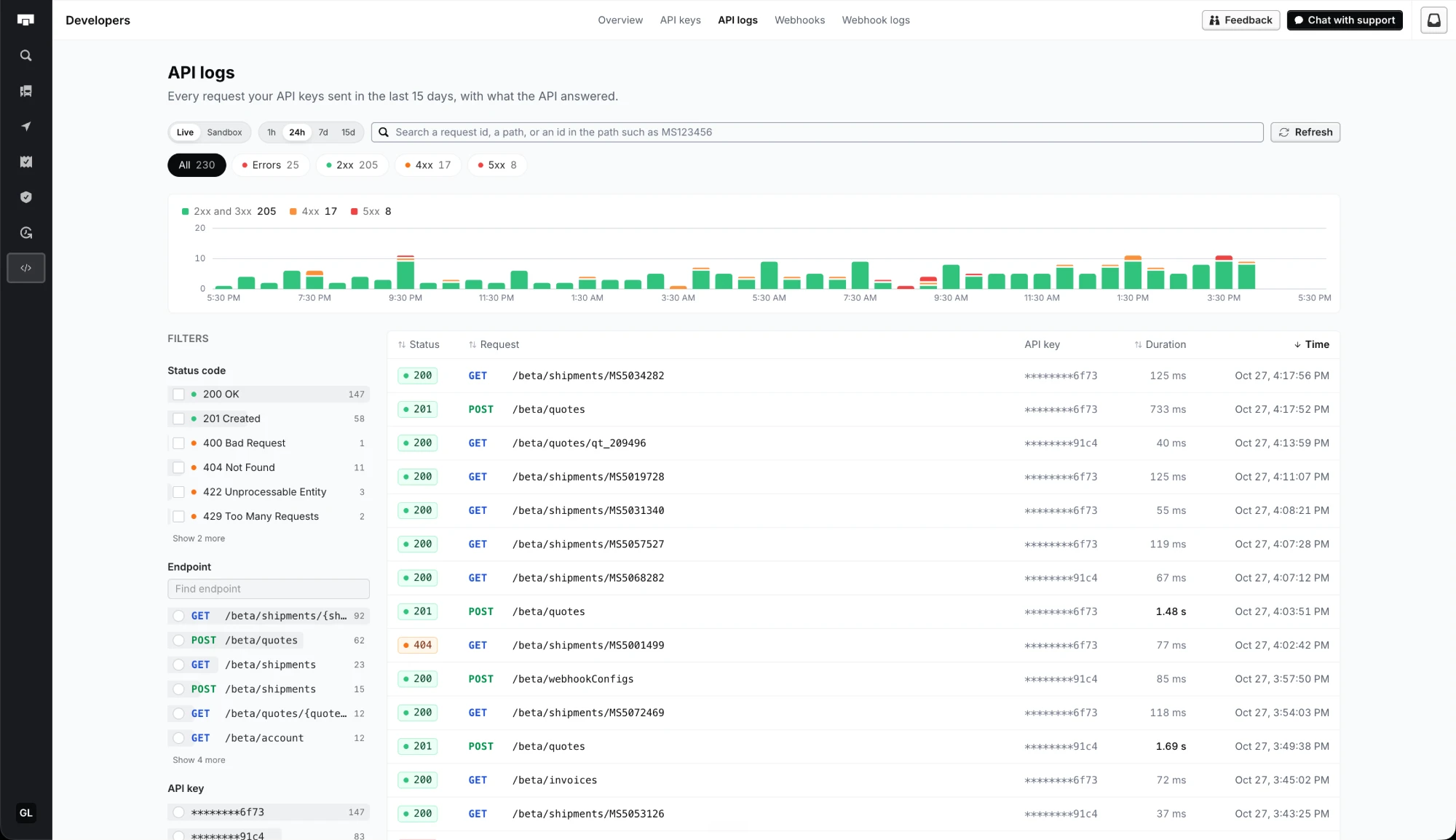
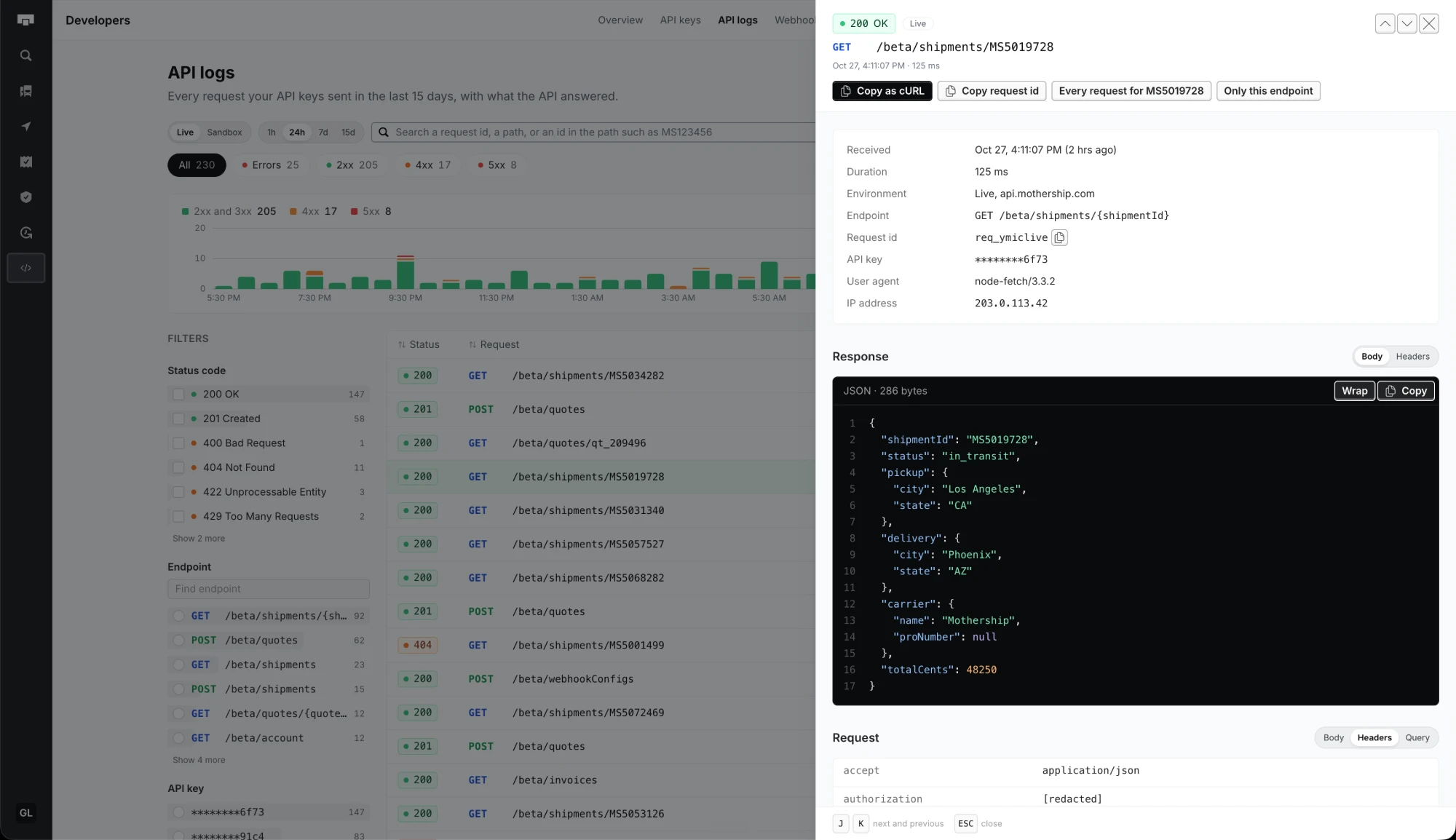
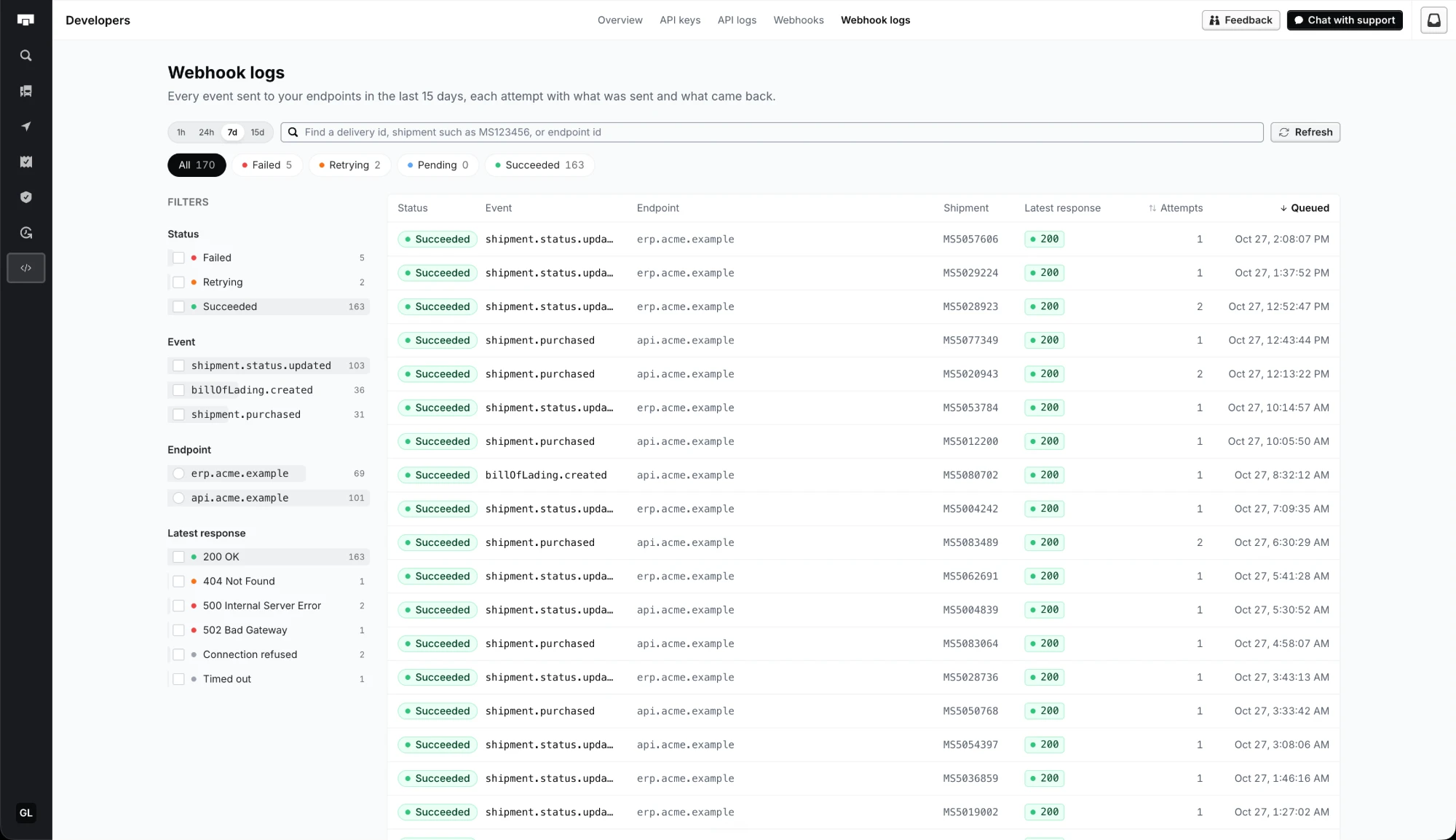
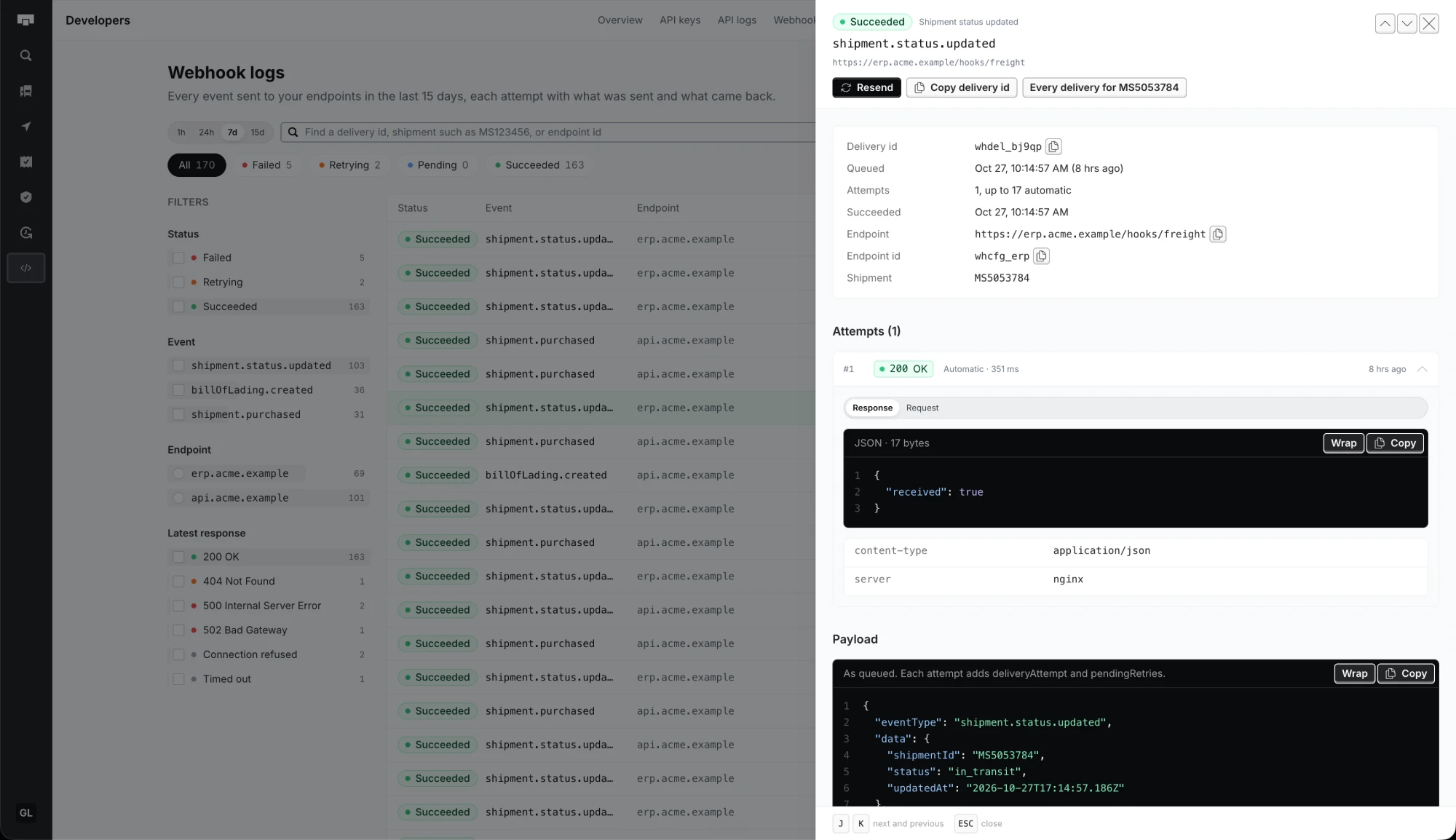
Requests, error rate, p95 response time and webhook success, with your busiest endpoints and latest errors.
API keys
Live and sandbox keys, hidden until you reveal them, each with when it was last used and how many requests it sent in 15 days. A new key comes with a request you can paste to check it works.
Create a key →Webhooks
Each endpoint you subscribed, with its delivery health over 15 days and a link to its deliveries.
Subscribe an endpoint →In your dashboard
Owners and developers find it in the sidebar, under Developers. Press D to open it.
Open Developers →Every filter, sort, time window and open request is in the page's URL, so a link shows a teammate what you see.
Reference
31 endpoints, strongly typed.
Every page is generated from one OpenAPI file, with parameters, schemas and examples. Pages update when the API does. Try it out now, from your browser.

Carriers
One integration. 14 carriers.
A quote asks the carriers on the lane and returns their rates in one array. Every rate has the same fields, whichever carrier sent it, so you never write a carrier integration.
One rate from the quote above
{"id": "G6EMET","creditsApplied": 0,"estimatedPickupDate": "2019-03-26T23:45:40.000Z","estimatedDeliveryDate": "2019-03-27T05:00:40.000Z","price": 108,"provider": "mothership","providerScac": "mhpg","services": [ "guaranteed" ],"transitDays": { "minimum": 0, "maximum": 0 },"warnings": [],"coveragePrice": 0,"coveredValue": 0}Every rate has these fields, whichever carrier sent it.Providers
21 service levels
A rate's services says what it includes, from delivery guaranteed by a set hour to a full truckload.
- standard
- guaranteed
- guaranteed08
- guaranteed09
- guaranteed10
- guaranteed11
- guaranteed12
- guaranteed14
- guaranteed15
- guaranteed1530
- expedited
- expedited12
- expedited17
- accelerated
- guaranteedWithinWindow
- guaranteedMultiHourWindow
- guaranteedSingleHourWindow
- capacityLoad
- dedicated
- teamDrive
- custom
You set the wait
Carriers answer at different speeds. A quote waits 25 seconds for rates. Set rateResponseTimeoutMs, down to 5 seconds, to answer sooner with the rates that are in.
Quote with what you know
A quote needs pickup, delivery, freight and pickupReadyDate, and a ZIP code is enough for each stop. metadata.invalidFieldsRequiredForPurchase lists what booking still needs.
Ship freight from your own code.
Powered by
Requires an approved Mothership account. Sign up →